
If you’re building a website—whether it’s a blog, WordPress site, small business, or online store—you’ve probably heard about Hostinger. They’re everywhere. And for good reason.
But here’s the thing: just because a hosting provider is popular doesn’t mean it’s right for you. So I’m going to give you the real breakdown on Hostinger in 2026—what you actually get, what it really costs, how it actually performs, and whether it’s worth your money compared to alternatives.
In this review, we’ll cover:
- Pricing (the honest version, not the marketing version)
- Performance and speed
- hPanel control panel
- WordPress hosting and AI tools
- How it compares to Bluehost and SiteGround
- Website migration
- What you get and what you don’t
By the end, you’ll know exactly whether Hostinger is worth it for your specific situation. Let’s go.
Hostinger Review 2026: What You Get

Hostinger isn’t just one hosting company offering one type of service. They’ve built out a pretty extensive platform over the years. Here’s what’s actually on the menu:
Hostinger offers Web Hosting, WordPress Hosting, Cloud Hosting, VPS Hosting, Agency Hosting, AI Website Builder, hPanel control panel, Website Migration, and Email Marketing (Hostinger Reach).
So they’re covering a lot of ground. The basic web hosting, cloud, and agency plans come with the AI builder. WordPress hosting is available across all these tiers. VPS is separate for developers. And their email marketing tool, Hostinger Reach, is a newer addition they’re pushing hard.
Is Hostinger Worth It in 2026?
Where Hostinger Offers the Most Value
Let’s be direct: Hostinger’s main appeal is pricing combined with solid features. They’ve managed to pack real value into entry-level plans in a way that genuinely matters if you’re bootstrapping a business or getting started with your first website.
Here’s what actually makes them competitive:
Low introductory pricing. Their starter plans are genuinely cheap—we’re talking under $3/month if you commit to 48 months. No asterisks yet, but yes, that’s real.
Good feature inclusion. You’re not paying extra for LiteSpeed caching, NVMe storage, or free migrations on most plans. These are things competitors charge extra for.
Performance stack that works. They’re using LiteSpeed, NVMe storage, and CDN on plans that don’t cost a fortune. That’s not common.
hPanel is actually good. Their control panel is clean, simple, and handles WordPress installation, domain management, emails, and backups without feeling clunky. Beginners get the simplicity they need, and power users still have access to what they want.
AI tools that actually help. The AI website builder and site management tools aren’t gimmicks. They actually save time if you’re not a designer or developer.
Who Is Hostinger Best Suited For?

Hostinger is genuinely solid for:
- Beginners launching their first website — Simple setup, straightforward pricing, good support
- Bloggers — WordPress optimization, performance, and cost-effective scaling
- Freelancers — Good balance of power and simplicity
- Small businesses — Affordable, reliable, room to grow
- Startups on a budget — Performance doesn’t mean expensive
- Small e-commerce stores — WooCommerce support, scalable to cloud hosting
Who May Need Something Different?
If you fit any of these descriptions, Hostinger might not be the perfect fit:
- Large organizations managing massive traffic and complex infrastructure
- Companies needing specialized server configurations beyond what managed hosting offers
- Developers who want completely unmanaged VPS control — Hostinger’s VPS is still somewhat managed
- Businesses requiring 99.99% guaranteed uptime SLAs — Some competitors offer these explicitly
Hostinger Pricing 2026: How Much Does It Actually Cost?

This is where we need to talk honestly, because Hostinger’s pricing works a specific way that catches people off guard.
Hostinger Introductory Pricing
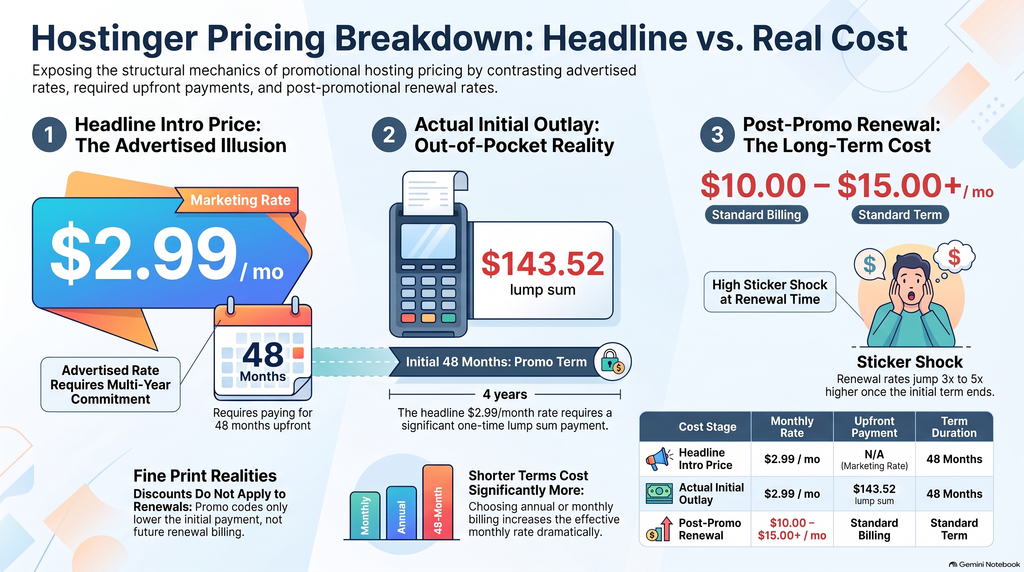
As of early 2026, Hostinger’s Premium web hosting plan shows $2.99/month on their homepage. That’s the headline number everyone sees.
But here’s what you’re actually paying: $143.52 upfront for 48 months, after which the price renews at a much higher rate.
What You Actually Pay With the 48-Month Plan
This is the critical part that most reviews get wrong:
The $2.99/month effective rate only works if you’re paying $143.52 upfront for 48 months. That’s a big lump sum for someone’s first hosting purchase. And here’s the thing—most people don’t think about the first-year equivalent that way. The effective monthly rate of $2.99 for a 48-month commitment doesn’t mean you’re only paying $35.88 in year one (though it can feel that way). It means you’re paying $143.52 right now for four years of hosting.
If you prefer to pay monthly or annually, the costs shift higher. This is a strategy Hostinger uses effectively—they make the long-term commitment artificially cheap to bring down the headline number.
Hostinger Renewal Prices
And here’s the second part of the equation: renewal pricing. After your 48-month introductory period ends, Hostinger renews at their standard rate, which is significantly higher. Most plans renew around $10-15/month at minimum, and can go much higher depending on which plan you choose.
This is crucial to understand because it means the first four years are subsidized. After that, you’re paying market rate. It’s not a scam—it’s just how the math works. You get cheap hosting as a loss leader to acquire customers, then they make money on renewals.
Over 2-4 years, your total cost depends entirely on when you renew and which plan you pick. Plan for the renewal price, not the introductory price.
Is Hostinger One of the Best Cheap WordPress Hosting Options?
For raw value—features per dollar—Hostinger is genuinely competitive. They include LiteSpeed caching, free migrations, and NVMe storage on plans where competitors charge extra. For someone with $50-100/year to spend, Hostinger delivers more than most alternatives.
That said, there’s no such thing as “best” hosting. There’s just “best for your specific use case.” For cheap WordPress hosting, Hostinger is in the conversation. Whether it’s number one depends on your priorities—uptime, speed, support, or pure price.
Hostinger Discount Code: How to Get the Best Price
How Hostinger Discounts Usually Work
Hostinger runs promotions constantly. You’ll see “70% off” or similar offers pretty regularly. Here’s what that actually means: they’re stacking discount codes on top of their already-promotional introductory pricing.
Sometimes these codes work. Sometimes they’re redundant with what you’d already get. It’s worth checking before you buy, but don’t feel like you’re missing out if the “perfect” code expires—their base pricing is already the deal.
What to Check Before Using Any Discount Code
Before you click “Buy,” verify these details:
- Plan duration — 48-month vs. annual vs. monthly changes the math
- Renewal rate — Does the code apply to renewals? Usually no.
- Domain conditions — Free domain? Does it stay free at renewal?
- Tax treatment — Are taxes included in the advertised price?
- Included features — Does the discounted plan have fewer features?
A cheap introductory price that renews at $15/month is very different from a slightly higher intro price that renews at $8/month. Read the fine print.
Hostinger Performance Review: LiteSpeed, NVMe & Caching
Hostinger’s Technology Stack
Hostinger’s web and cloud hosting plans use LiteSpeed—that’s a web server technology that’s faster than the older Apache. They pair it with NVMe storage (faster than standard SSD) and include CDN and object caching on qualified plans.
In English: they’ve built their infrastructure around speed. LiteSpeed caching, NVMe storage, and global CDN are the three things that actually make hosting fast, and Hostinger includes them at entry-level price points.
Why NVMe Storage Actually Matters
NVMe storage is faster than traditional SSD by a significant margin. When your WordPress site loads, the server pulls files from storage. Faster storage = faster load times. It’s that simple. Most cheap hosting still uses standard SSD. Hostinger using NVMe across their plans is why they perform better than the price would suggest.
How Caching Affects WordPress Speed
Caching is what actually makes WordPress fast. Without it, WordPress runs a database query for every page load. With LiteSpeed caching, that’s handled automatically. You get lightning-fast repeat visits without doing anything.
Most web hosts include this now, but budget hosts sometimes don’t. Hostinger does, which is why they’re competitive on speed despite the price.
Real Talk on Performance Testing
Here’s where I’m going to be honest: performance testing is methodology-dependent. The TTFB (time to first byte) you see tested on one site might be different on another site, depending on where the test is run from, what WordPress theme and plugins are installed, and how caching is configured.
I’m not going to give you a single “Hostinger TTFB” number and claim it’s truth. The reality is that Hostinger performs well for US visitors compared to budget hosting, but the exact numbers depend on your setup.
If you care about verified performance data, Hostinger publishes some benchmarks on their site. Independent testing shows they’re solid but not exceptional. They’re in the middle of the pack for budget hosting, which is the right expectation.
Hostinger hPanel Review & Tutorial
What Is hPanel?
hPanel is Hostinger’s custom control panel—the dashboard where you manage your hosting. It’s replacing cPanel, which is what most hosting companies use. Hostinger built their own because they thought cPanel was too complicated for beginners.
What You Can Actually Manage From hPanel
From hPanel, you can manage:
- Multiple websites and domains
- Email accounts
- SSL certificates
- Backups and restores
- Databases
- WordPress installations and updates
- File management and FTP
- Hosting resources (for cloud hosting)
The design is clean and minimal. There’s a WordPress section that handles one-click installs, updates, and optimizations. For beginners, this is exactly what you need. For power users, advanced options are still available if you dig into settings.
Is hPanel Easy for Beginners?
Yes. It’s genuinely one of the better control panels for someone who’s never hosted a website before. The WordPress stuff is obvious. Email setup is straightforward. It doesn’t overwhelm you with options you don’t need.
Hostinger AI Tools: Build and Manage a Website Faster
Hostinger AI Builder
In 2026, Hostinger’s AI website builder has become one of their standout features. You describe what you want—”a photography portfolio with e-commerce” or “a services website for a plumber”—and the AI generates a complete site structure with content, images, and layout.
The result isn’t production-ready without tweaks, but it gets you 80% of the way there instead of starting with a blank page. For someone who’s not a designer, this is genuinely useful.
It’s available on their Web, Cloud, and Agency hosting plans—not on VPS.
How AI Website Management Works
Beyond building, Hostinger also offers AI-assisted website management. This means AI can help troubleshoot common issues, suggest content improvements, and even optimize pages for SEO. It’s not a replacement for knowing what you’re doing, but it’s helpful context for people just starting out.
Real Talk on AI-Powered Website Launch Time
Can AI really reduce how long it takes to launch a website? Technically yes, if you were starting from zero and had no design skills. Instead of hiring a designer or spending weeks learning Elementor, you describe your site and get something usable in hours.
But if you already know what you’re doing, this doesn’t speed things up. It’s a shortcut for beginners, not a productivity tool for pros.
Hostinger Hosting Plans Explained
Web Hosting (Standard)
Their foundational offering. Built for beginners, blogs, small businesses, and simple WordPress sites. One website, basic resources, but solid performance for traffic under 10k/month. This is where most people start, and it’s appropriate for that audience.
Cloud Hosting
For growing websites, e-commerce stores, and sites getting real traffic. More resources than shared hosting, auto-scaling, and the ability to handle traffic spikes. If your blog is getting 50k+ monthly visits or you’re running a real e-commerce operation, this is where you graduate.
Hostinger’s cloud hosting includes NVMe, CDN, and managed WordPress tools. It’s the sweet spot between shared hosting and full VPS.
VPS Hosting
For developers, advanced projects, and anyone who needs custom server configuration. Hostinger uses KVM-based infrastructure with AMD EPYC processors, NVMe storage, weekly backups, and a 1 Gbps network connection.
This is no longer managed hosting—you’re responsible for server management, security updates, and configuration. But you have full control.
Agency Hosting
For web agencies and freelancers managing client websites. Multiple site isolation, unbranded client dashboards, and collaboration features. You can white-label the hosting for your clients.
Hostinger vs Bluehost
Since you’re probably comparing options, let’s talk about Bluehost—the other major budget hosting player in 2026.
On pricing: Both are cheap upfront. Bluehost’s introductory pricing is competitive with Hostinger, but renewal rates are often higher.
On WordPress: Bluehost is officially recommended by WordPress.org, which they love to mention. Hostinger is just as good for WordPress, but without that official badge.
On performance: Both perform similarly. Both use modern infrastructure. No significant difference here.
On features: Hostinger has AI tools and a cleaner control panel. Bluehost has 99.99% uptime SLA and more human support (which matters if you need help).
The decision comes down to: Do you value simplicity and AI tools (Hostinger) or official WordPress endorsement and stronger support guarantees (Bluehost)? For most people starting out, either works fine.
Hostinger vs SiteGround
SiteGround is in a different price tier—higher than Hostinger but not enterprise-level. Here’s the reality:
SiteGround will cost you 2-3x more than Hostinger’s introductory pricing. In return, you get faster support, better performance, and stronger uptime guarantees. If you can afford it and your website generates revenue, SiteGround is the better choice. If you’re bootstrapping, Hostinger is the logical starting point.
Performance differences exist but are small in real terms. SiteGround is faster, but we’re talking 200ms vs 400ms first load times—both are fine. Hostinger is the budget option that doesn’t sacrifice basics.
Hostinger for E-commerce & Online Stores
Is Hostinger Good for WooCommerce?
Yes. Hostinger includes WooCommerce support across their plans, automatic WordPress updates, and performance optimization specifically for WordPress/WooCommerce sites. Their cloud hosting tier is where you should run a real store if traffic matters.
When to Move From Web Hosting to Cloud
Start with shared web hosting. If you hit 20-30k monthly visitors or see consistent traffic spikes, upgrade to cloud hosting. The cost increase is real but small, and the performance difference is noticeable. Hostinger makes this migration simple—no site rebuild required.
Hostinger Website Migration: Is It Really Easy?
Free Website Migration
Hostinger offers unlimited free migrations from other hosts. They’ll move your WordPress installation, databases, files, and email without you doing anything. In theory, this is a pain-free transition.
In practice, migrations have a small risk of downtime. Hostinger keeps your site online during the transfer, but there’s always a DNS propagation period where some visitors might hit the old server. This is standard stuff, not unique to Hostinger.
Before You Migrate
Have your current hosting login details ready. Document your email setup and any custom configurations. Hostinger’s migration team will handle the technical work, but they need access and information from you.
Hostinger Reach: Email Marketing Tool
What Is Hostinger Reach?
Hostinger Reach is their answer to Mailchimp. It’s an AI-powered email marketing and automation platform that’s integrated with your hosting account. Create campaigns, send newsletters, and set up automations—all from one place.
The Reality
For most small businesses, this works fine. It’s not MailerLite or Flodesk, but it’s not meant to be. It’s adequate for sending newsletters and basic automations if you’re already in Hostinger’s ecosystem.
Honest Pros and Cons of Hostinger
What Hostinger Does Well
- Pricing/value ratio: Best intro pricing in budget hosting tier
- Performance stack: LiteSpeed, NVMe, CDN on affordable plans
- hPanel: Better than cPanel for beginners
- AI tools: Actually useful, not just marketing fluff
- Free migrations: No lock-in, easy to leave if needed
- Variety: Web, Cloud, VPS, Agency—pick your tier
Where Hostinger Falls Short
- Renewal pricing: Sticker shock after year one
- Upfront 48-month commitment: Large initial payment
- Feature limitations on low tiers: Email limits, bandwidth caps, limited subdomains
- Support: Good but not exceptional. Chat is available but can be slow
- Not for advanced users: If you need complete server control, look elsewhere
Frequently Asked Questions
Is Hostinger worth it in 2026?
For beginners and small businesses with limited budgets? Yes. For large operations or advanced users? Probably not. It depends on your specific needs.
Is Hostinger good for WordPress?
Yes. WordPress optimization, one-click install, and management tools are solid.
How much does Hostinger cost?
From $2.99/month (48-month commitment, $143.52 upfront) to much higher on renewal. Check current pricing when you visit.
Does Hostinger use LiteSpeed?
Yes, on Web and Cloud hosting plans.
Is Hostinger faster than Bluehost?
Slightly, in most tests. But both are fast enough for most sites.
Does Hostinger have a free domain?
Yes, included with most plans for the first year.
Does Hostinger offer free migration?
Yes, unlimited free migrations.
Is Hostinger’s AI website builder good?
Good for beginners. Not a replacement for professional design, but a solid shortcut.
Final Thoughts: Is Hostinger Worth It in 2026?
Here’s the real answer, broken down by who you are:
For beginners: Hostinger makes sense. Easy setup, simple control panel, solid performance, and cheap pricing get you online without overwhelm.
For WordPress users: Good choice if you’re optimizing for cost. Solid WordPress tools and performance.
For startups on a budget: Great value per dollar, room to grow as you scale.
For growing e-commerce: Web hosting to start, cloud hosting when you’re ready to scale.
For developers: VPS gives you control, but there are better options in this category.
For agencies: Agency hosting plan is solid for managing client sites.
The key is understanding what you’re getting. Cheap upfront pricing, solid-but-not-exceptional support, good performance, and a control panel that doesn’t stress beginners out. At renewal time, prices jump. This is worth it for people getting real business value from their website.
If you’re building something that matters—a blog with an audience, an e-commerce store making sales, a business generating leads—Hostinger gives you the tools without breaking the bank in year one.
Ready to give it a try? Check Hostinger’s current plans and available promotions before making your decision. Each plan has different features and pricing, so make sure you’re comparing apples to apples based on what you actually need.